Restore an old photo
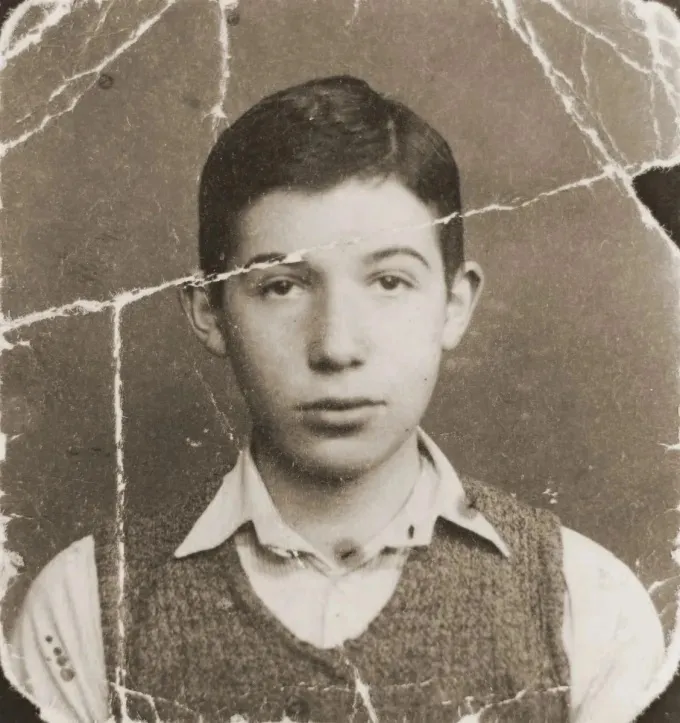
Scratches, tears, creases, stains and fading — repaired in about a minute. Faces are protected in the instructions, and you compare the result with the original; on group photos, check every face.
Free during early access · 2 restorations a day
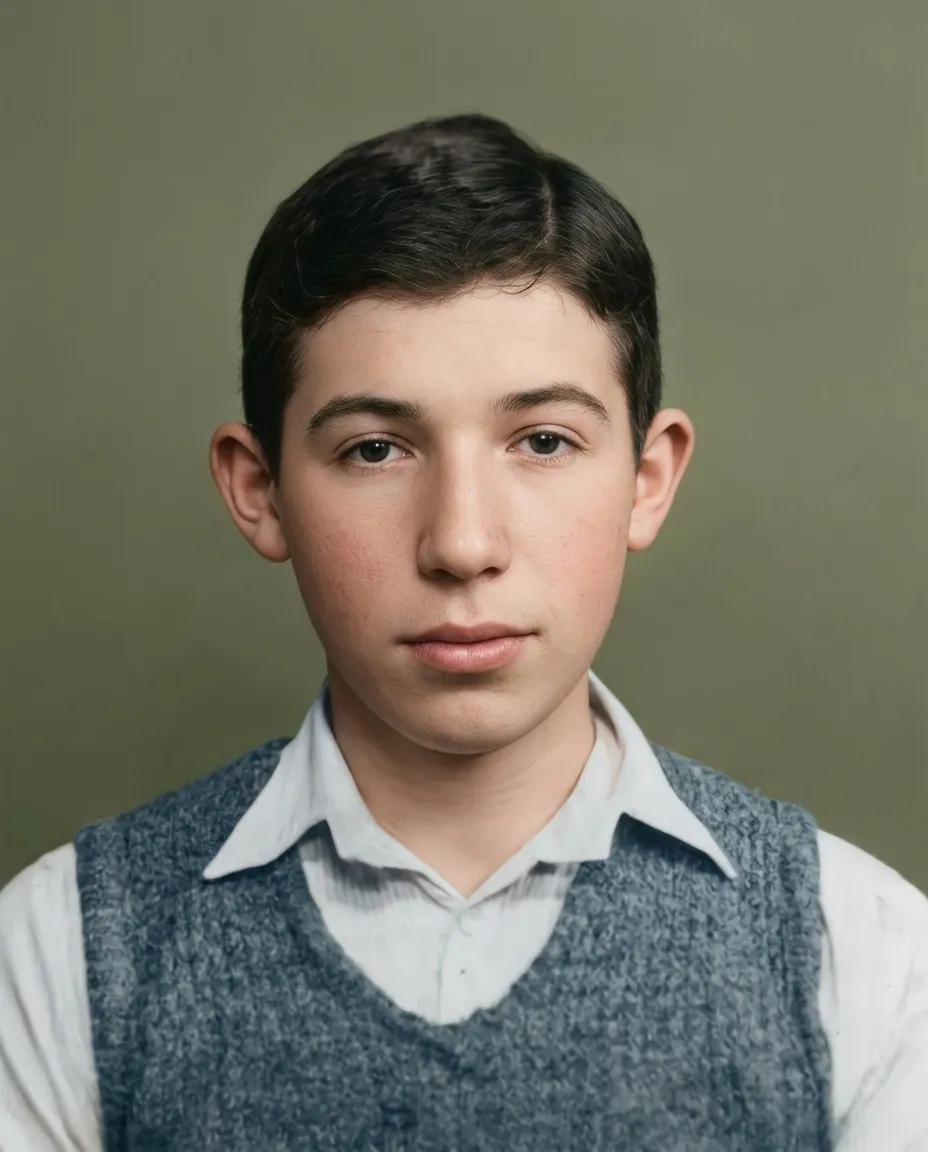
Restoring an old photo here is one pass, not a list of services to tick. The scan is read first, only the damage actually on it is repaired, and a black-and-white print comes back in color. You see all of it before deciding anything.
- Scratches, dust and spots removed
- Tears and creases repaired
- Faded contrast and color brought back
- Facial features protected in the instructions
How it works
Send the photo
Scan it, or just photograph the print with your phone. Shoot straight-on in daylight, without flash, and fill the frame with the photo. The table, your fingers and the album page around it are removed automatically.
The photo is read first
Before anything is repaired, the picture is examined: where the print sits inside the file, which way up it is, whether it is black-and-white or faded color, and which damage is actually present. Only the damage that is really there gets repaired.
You see the result
A restored photo comes back in about a minute. You look at it before you decide anything — if it is not right, you have not paid.
What gets repaired
- Tears and splits, closed and rebuilt from the image on both sides
- Scratches, dust and emulsion cracks
- Brown foxing, water stains and mold blooms
- Creases and fold lines
- Missing edges and corners
- Silvering — the metallic sheen on the darkest areas of an old print
- Faded contrast, and color that has shifted with age
- Glare and the crooked angle from a phone shot of a print
Against a retoucher by hand
| Epoha | A retoucher | |
|---|---|---|
| Time | About a minute | Three to seven days |
| You see it before paying | Always | Rarely — usually a deposit first |
| Color for a black-and-white photo | Included | Usually charged separately |
| A second opinion on the same photo | Run it again | A new order |
| Judgment about what the photo should look like | Follows what is in the print | A person decides, and sometimes decides better |
What restoration will not do
It will not turn one person into another. Faces are the part the model is told, in detail, to leave alone: the shape of the nose, the set of the eyes, the line of the jaw, the age in the skin. Where a print is too damaged to show what was there, the face is left plainer rather than filled in with invented detail — an idealised face is a smaller lie than a made-up one.
It will not add what was never in the frame: a missing arm, the other half of a torn group photo, a background nobody photographed. And it will not keep the paper — the white border, the album page, the ragged edge and the deckle are removed, because what you came for is the photograph, not the object it was printed on.
Questions
Will it work on a badly damaged photo?
Usually yes. Deep tears, missing corners and heavy scratches are reconstructed from the surrounding image. If a face is more than half destroyed, the result may not be reliable — you will see it before paying either way.
Do I need a scanner?
No. A phone photo of the print works: shoot straight-on in daylight without flash, and fill the frame with the photo.
What resolution do I get?
About 1,400 pixels on the long side — right for a frame on a shelf or a small print, not for a large canvas. You see the file before you decide anything.
Colorize a black-and-white photo
Natural, believable color for black-and-white and sepia photos — skin, fabric, sky and foliage each treated the way film would have seen them.
EnhanceEnhance a blurry photo
Soft focus, motion blur, tiny prints and low-resolution scans — turned into clear, clean images.